
Key Highlights
- The x default hreflang tag acts as a fallback when no language or region match exists.
- It helps Google show the right page to the right users across different countries.
- Use it for global homepages, country selectors, or default versions of your site.
- Avoid using x default when every page already targets a clear language or region.
- Correct setup requires absolute URLs, return tags, and consistent hreflang mapping.
- A site audit helps catch hreflang errors before they affect search results.
When you’re managing a multilingual website, success in SEO often comes down to one simple outcome: showing the right page to the right users. But in reality, it is rarely that simple. Once your site starts targeting different countries, regions, and languages, search engines can easily pick the wrong version of your page, even when the correct language version exists.
This is where hreflang becomes essential. It helps Google understand how your different language versions and regional variants connect. But even with a well-structured setup, there is still a common gap. What happens when a user does not match any defined language or region?
That is exactly where the x default hreflang tag comes in. In this guide, you will learn how it works, where it fits into your technical SEO strategy, and how to implement it correctly to avoid errors and improve your search results.
What Is the x Default Hreflang Tag?
The x default hreflang tag is a value used within hreflang HTML tags to define a fallback URL when no specific language version or regional version of a page matches the user.
The x default hreflang tag is an HTML attribute that tells search engines which version of your site should be shown when no other language version of a page applies.
Unlike standard hreflang values, it is not tied to a country code, such as the United States or the United Kingdom, nor to a specific language like English or a German version. Instead, it acts as a neutral fallback within your versions of a page, ensuring there is always a valid destination.
This becomes important because hreflang is not just about mapping different languages. It is about making sure every user lands on a usable page, even when an exact match does not exist.
How Does Google Use x Default in Hreflang Clusters?
To understand the role of x default, it helps to look at how Google processes hreflang at a cluster level.
Google groups related HTML pages into clusters, where each entry represents one of the versions of a page targeting a specific audience. Within this structure, every language version, regional variant, and fallback option works together as a single system.
When a user triggers search results, Google evaluates the following signals in order:
- The user’s preferred language
- Their geographical location
- Available regional variants
- If no match exists, the x default hreflang tag
Decision Flow
| Scenario | Result |
| Exact match (language + region) | Serve the correct version |
| Language match only | Serve the closest language version |
| No match | Serve the default version via x default |
Example
- A user in the United States sees an English page
- A user in the United Kingdom sees a UK-specific version
- A user outside defined regions is served the default version
This structured fallback ensures users are not sent to the wrong page and improves alignment between content and intent. Without it, Google may choose a page arbitrarily, which weakens both targeting and user experience.
When Should You Use x Default Hreflang?
Once you understand how Google processes fallback logic, the next step is knowing when to actually use it. The goal is to support your international SEO strategy, not complicate it.
Use It When
The x default hreflang tag is most effective in scenarios where a neutral or global fallback is required:
- You have a global homepage acting as a default version
- You use a language or country selector page for different countries
- You serve users across different regions without full localisation
- Your content does not cover all the different languages
In these cases, x default ensures users still reach a functional and relevant version of your page.
Avoid It When
There are also situations where using x default adds no value and can introduce errors:
- Your site targets only one language version
- Each specific page already maps clearly to a region
- There is no need for a fallback version of your site
Overusing the x default hreflang tag can dilute targeting signals and create unnecessary complexity. In a clean setup, every tag should have a clear purpose.
How Do You Implement x Default Hreflang Correctly?
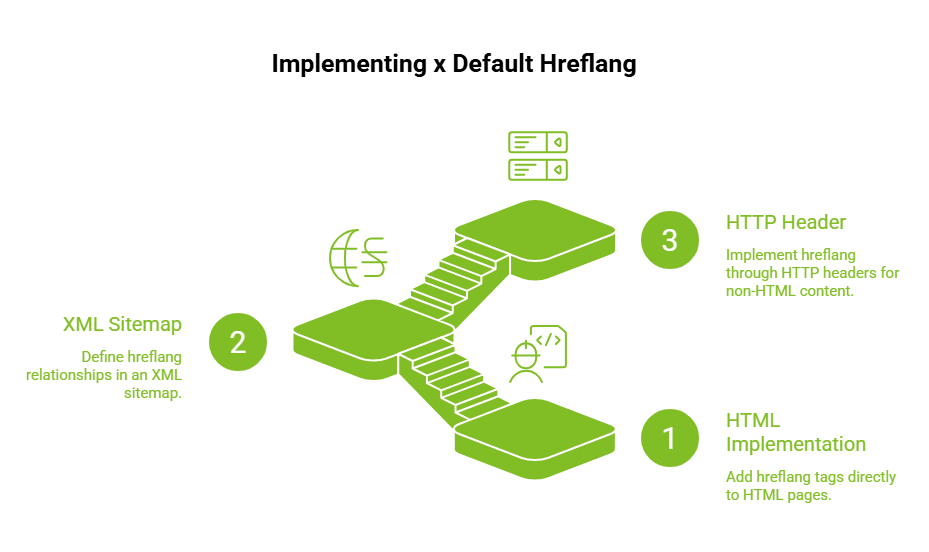
Once you understand where the x default fits, implementation becomes a matter of choosing the right method for your setup. The goal remains consistent across all approaches: every version of your page should clearly connect to its alternatives, including a defined fallback.
The method you choose depends on how your site is structured and how scalable your technical SEO setup needs to be.
1. HTML Implementation
The most direct approach is adding hreflang HTML tags inside the <head> section of your HTML pages. This method works best when you have control over templates and a manageable number of pages.
<link rel=”alternate” hreflang=”en-us” href=”https://example.com/us/” />
<link rel=”alternate” hreflang=”en-gb” href=”https://example.com/uk/” />
<link rel=”alternate” hreflang=”de” href=”https://example.com/de/” />
<link rel=”alternate” hreflang=”x-default” href=”https://example.com/” />
Key points to check:
- Use absolute URLs, not relative URLs
- Place tags in the <head> section of each page
- Keep mapping consistent across all language versions
- Ensure every listed page returns the same hreflang set
This approach gives you precise control, but it becomes harder to maintain as the number of pages increases.
2. XML Sitemap Implementation
As your site grows, maintaining hreflang at the page level can become inefficient. This is where XML sitemaps provide a more scalable solution.
<url>
<loc>https://example.com/</loc>
<xhtml:link rel=”alternate” hreflang=”x-default” href=”https://example.com/” />
</url>
Instead of editing each page, you define relationships centrally. This works well for websites with multiple language versions, regional variants, or dynamically generated pages.
3. HTTP Header Implementation
Not all content exists as HTML pages. For files like PDFs or downloadable assets, hreflang must be implemented through HTTP headers.
Link: <https://example.com/>; rel=”alternate”; hreflang=”x-default”
This method ensures that even non-HTML resources can be included in your hreflang structure when needed.
To keep implementation clean, avoid mixing methods unless necessary. Choose one primary approach, document it clearly, and validate it across all versions of your site.
What Are Correct and Incorrect x Default Hreflang Examples?
Once implementation is in place, the next challenge is accuracy. Most hreflang issues do not come from syntax, but from incorrect mapping between pages.
Looking at real scenarios helps you identify where setups typically fail.
| Scenario | Correct Setup | Incorrect Setup | Impact |
| Global homepage | Points to a selector or neutral page | Points to a US-only page | Users outside the United States may see irrelevant content |
| Missing fallback | Includes x default | No fallback defined | Google may choose inconsistent pages in search results |
| Multiple mappings | One clear fallback per cluster | Duplicate or conflicting entries | Hreflang errors and broken clusters |
Example
- Correct setup: A global homepage or selector page acts as the default version.
- Incorrect setup: A United States page is used as the fallback for all users, including those in the United Kingdom or other regions.
- This misalignment often results in poor user experience, incorrect search engine results, and avoidable duplicate content issues.
How Do You Check Hreflang Tags During an Audit?
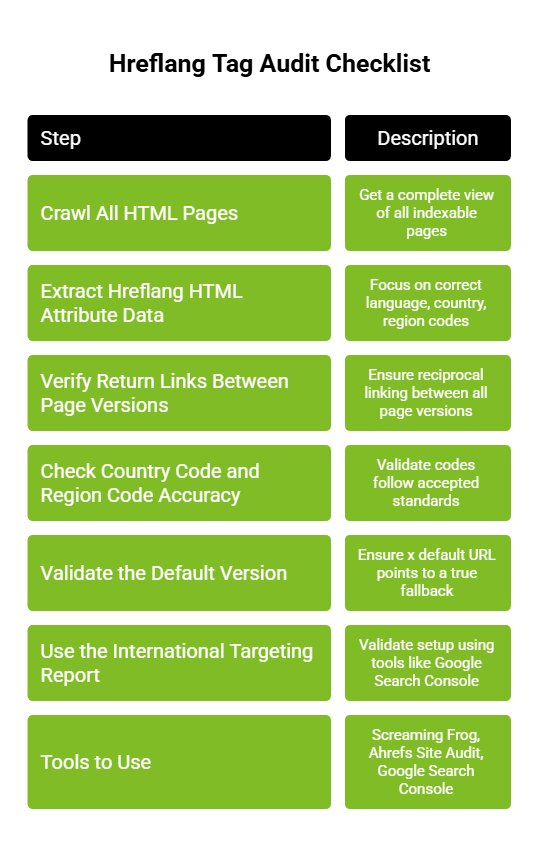
After implementation, validation becomes critical. Without a structured audit, even a technically correct setup can fail due to missing links or incorrect mappings.
A proper site audit ensures that each version of your page is connected correctly and serves the right audience across different regions.
1. Crawl All HTML Pages
Start by crawling your entire site. This gives you a complete view of all indexable pages and helps identify where hreflang tags are present, missing, or inconsistent.
2. Extract Hreflang HTML Attribute Data
Once crawled, extract the hreflang data for each page. Focus on whether the language, country, and region codes are correctly defined and consistently applied.
3. Verify Return Links Between Page Versions
Hreflang relies on reciprocal linking. Each page must reference all other versions, and those versions must link back. Missing return links break the relationship between pages.
4. Check Country Code and Region Code Accuracy
Validate that all codes follow accepted standards, such as en-us en-gb. Incorrect formats can cause search engines to ignore the tags entirely.
5. Validate the Default Version
Ensure the x default URL points to a true fallback, such as a global or selector page. It should not point to a region-specific page unless that is intentionally your default.
6. Use the International Targeting Report
Finally, validate your setup using tools like Google Search Console. The international targeting report helps identify hreflang errors and highlights issues that may not appear in crawlers.
7. Tools to Use
A strong audit does more than detect errors. It confirms that the correct version is delivered to the right users, which is the core objective of any international SEO strategy.
What Are the Most Common Hreflang Mistakes That Break SEO?
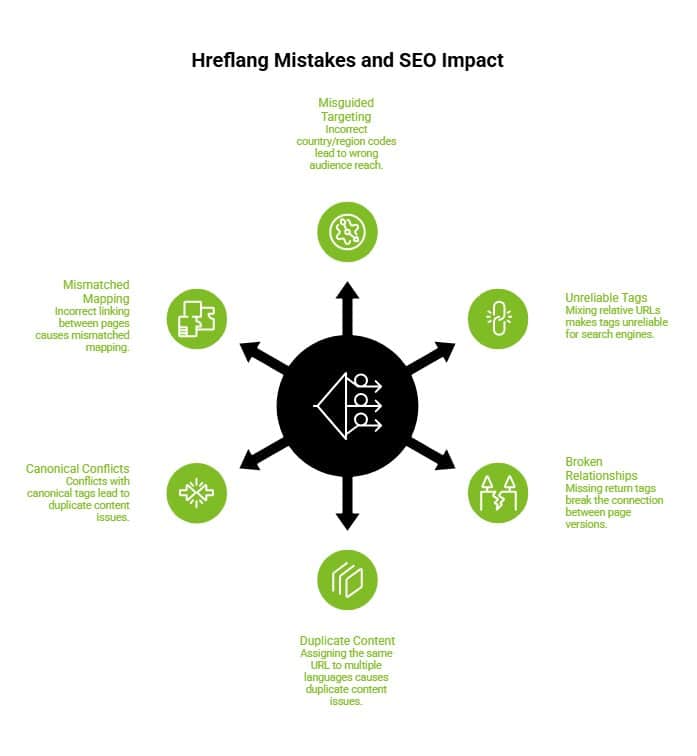
Even a technically sound setup can fail if small errors creep into your hreflang implementation. These issues usually happen at the mapping or formatting level, but their impact is cluster-wide.
Here are the most critical mistakes to watch for:
- Using an incorrect country code or region code, which misguides targeting
- Mixing relative URLs instead of absolute URLs makes tags unreliable for search engines
- Missing return tags, which breaks the relationship between versions of a page
- Assigning the same URL to multiple different language versions
- Creating conflicts with canonical tags, leading to duplicate content issues
- Incorrect linking between pages, such as mismatched mapping between page B and its alternatives
These errors prevent search engines from identifying the correct version of your content. As a result, users may see the wrong page in search results, weakening your international SEO strategy.
How Can You Fix Hreflang Issues Step by Step?
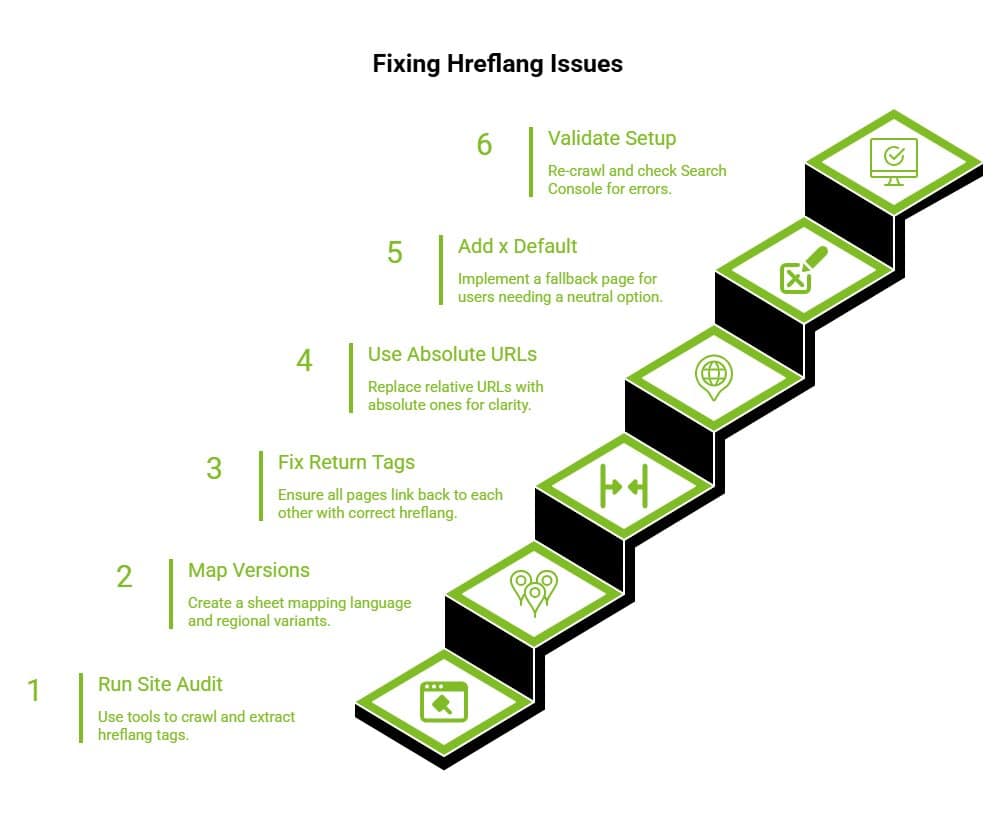
Once hreflang errors are found, avoid fixing them page by page without a plan. Hreflang works as a connected cluster, so every language version, regional version, and fallback URL must be corrected together to avoid creating new targeting issues.
Step 1: Run a Complete Site Audit
Use tools like Screaming Frog, Ahrefs, or Semrush to crawl all HTML pages and extract existing hreflang tags. Check which pages have missing tags, incorrect codes, broken URLs, or no return links.
Step 2: Map Each Language and Regional Version
Create a clean mapping sheet for every version of your page. Include the English version, German version, regional variants, country code, region code, and default version where applicable.
Step 3: Fix Return Tag Issues
Every hreflang page must link back to the other pages in the cluster. If page A points to page B, page B must also point back to page A with the correct hreflang value.
Step 4: Use Absolute URLs
Replace relative URLs with absolute URLs across all hreflang tags. This reduces confusion and helps search engines understand the exact page location without relying on site structure assumptions.
Step 5: Add x Default Where a Fallback Is Needed
Use the x default hreflang tag only when users need a neutral fallback page. This is usually a global homepage, country selector, or default version of your site.
Step 6: Validate the Final Setup
Re-crawl the site after implementation. Check Search Console, hreflang testing tools, and your international targeting report to confirm that errors are fixed and the correct version appears in search results.
A strong hreflang fix depends on consistency across the full cluster. Once validated, keep monitoring after major site updates, migrations, or new market launches.
What Is the Difference Between x Default Hreflang and Canonical Tag?
Although both are part of technical SEO, hreflang and canonical tags solve different problems and should never be used interchangeably.
| Factor | x Default Hreflang | Canonical Tag |
| Purpose | Defines fallback for unmatched users | Controls duplicate content |
| Scope | Supports international SEO strategy | Manages indexing signals |
| Impact | Routes users to the right page | Prevents duplicate indexing |
| Usage | Across different regions and languages | Across duplicate or similar URLs |
In practice, hreflang determines which version of your page should be shown to users, while canonical tags signal which version should be indexed. When aligned correctly, they prevent both misrouting and indexing conflicts.
Does X Default Hreflang Affect Rankings?
The x default hreflang tag does not directly impact rankings in search engine results. It is not treated as a ranking signal.
However, it plays an indirect role by improving:
- Alignment with the user’s preferred language
- Delivery of the correct version across different countries and regions
- Overall, a better user experience, which influences engagement metrics
According to Google’s hreflang documentation, correct implementation helps ensure users land on the right page, which supports performance even if it does not directly boost rankings.
What Should You Check Before Deploying Hreflang Tags?
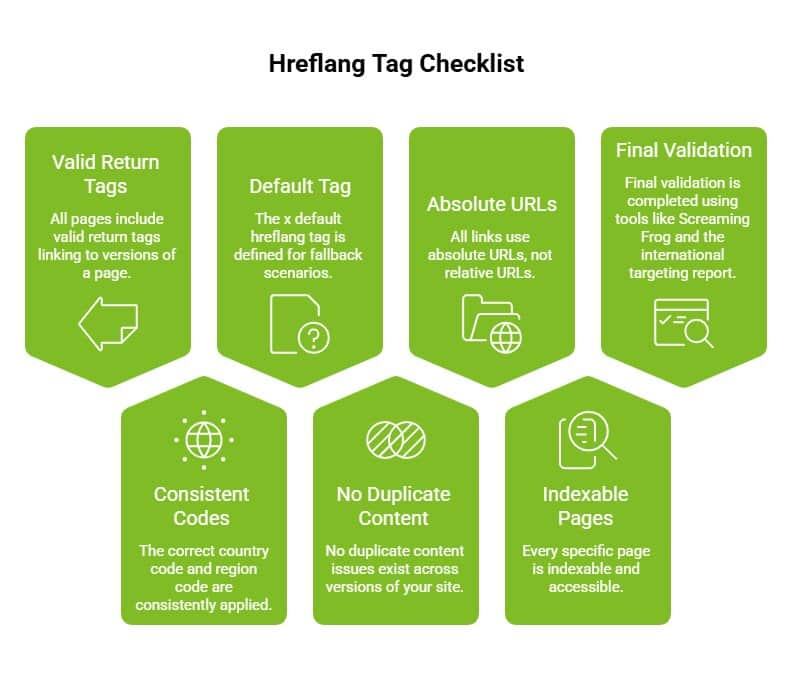
Before going live, a structured validation step ensures your implementation avoids common errors and works as intended.
Use this checklist:
- All pages include valid return tags linking to versions of a page
- The correct country code and region code are consistently applied
- The x default hreflang tag is defined for fallback scenarios
- No duplicate content issues exist across versions of your site
- All links use absolute URLs, not relative URLs
- Every specific page is indexable and accessible
- Final validation is completed using tools like Screaming Frog and the international targeting report
This final step ensures search engines can interpret your setup correctly and consistently deliver the right users to the right page across all different regions.
Need Help Fixing Hreflang and International SEO Issues?
Hreflang errors are easy to miss but expensive to ignore. A wrong country code, a missing return tag, or a poorly mapped default version can quietly send users to the wrong page and weaken your international SEO performance.
At Wild Creek Studio, we help brands build cleaner, stronger technical SEO foundations. From hreflang audits and site structure checks to international targeting fixes, our team helps ensure every version of your page is mapped, validated, and ready for the right audience.
Whether you are expanding into new regions, managing multiple language versions, or cleaning up duplicate content issues, a proper audit can help you find what is blocking performance.
Want to know if your hreflang setup is working correctly? Get a technical SEO audit from Wild Creek Studio and fix the gaps before they affect your search results.
Conclusion
The x default hreflang tag is a small but essential component of any international SEO strategy. It ensures that when search engines cannot find a perfect match, they still deliver a meaningful default version of your content.
Without it, Google may serve the wrong page, leading to poor engagement and lost opportunities. With it, you gain control over how your versions of a page are delivered across different countries and different regions.
The next step is clear. Run a full site audit, identify hreflang errors, and ensure every version of your page is correctly mapped. Because in global SEO, showing the right page to the right users is what drives real performance.
Frequently Asked Questions
What Are Hreflang Tags and Why Are They Important for SEO?
Hreflang tags are HTML attributes that tell search engines which language version or regional version of a page to show in search results. They are important because they help deliver the correct version to the right audience and prevent duplicate content issues.
How Does the x Default Attribute Work in Hreflang Tags?
The x default attribute acts as a fallback when no specific language or region matches the user. It ensures a default version of your page is served instead of letting search engines choose a potentially irrelevant page.
How Do I Implement Hreflang Tags on My Website?
You can implement hreflang tags using HTML tags in the head section, XML sitemaps, or HTTP headers. The key is to use absolute URLs, correct language and country codes, and ensure all versions of a page link back to each other.
What Are Common Mistakes to Avoid When Implementing Hreflang?
Common mistakes include using incorrect country or region codes, missing return tags, mixing relative URLs, and mapping multiple language versions to the same URL. These errors can break hreflang clusters and lead to wrong page delivery.
How Do I Test if Hreflang Tags Are Working Correctly?
You can test hreflang tags using tools like Screaming Frog, Ahrefs, or Google Search Console’s international targeting report. These tools help identify errors, missing tags, and incorrect mappings across versions of your site.
Do Hreflang Tags Affect Google Rankings?
Hreflang tags do not directly impact rankings. However, they improve how search engines serve the correct version of your page to users, which enhances user experience and can indirectly support better performance in search results.
Can You Explain the Difference Between Hreflang Tag Attributes?
Hreflang tag attributes define how search engines interpret language and regional targeting for a page. The key attributes include hreflang, which specifies the language or region (like en-us or en-gb), and href, which provides the URL of that version. The rel=”alternate” attribute signals that the linked page is an alternative version. Together, these attributes help search engines connect different language versions and serve the correct version to users.