Key Highlights
- A technical SEO audit checks whether search engines can crawl, index, render, and load your website without errors.
- Common issues found include crawl errors, indexation gaps, slow pages, poor site structure, and conflicting technical signals.
- The audit covers crawlability, index control, internal linking, page speed, mobile readiness, security, and structured data.
- Running audits before SEO campaigns, after site changes, during traffic drops, and as routine maintenance prevents hidden blockers.
- A 13-step checklist helps turn audit data into clear fixes instead of isolated tool warnings.
- For expert-led audits that prioritise fixes and connect technical SEO to business goals, Wild Creek Web Studio provides focused, execution-ready solutions.
Many websites fail to reach their organic traffic potential even with strong content and backlinks. The reason is often technical. Crawl issues, slow load times, and indexation errors quietly prevent search engines from fully understanding and ranking pages, limiting visibility from the start.
When these problems go unresolved, SEO efforts stall. Pages may exist but not get indexed, important content may sit too deep in the site structure, and performance issues can push both users and rankings away. Over time, these hidden technical gaps restrict growth and reduce the impact of ongoing SEO work.
This blog shows you exactly how to uncover and fix those issues through a structured technical website SEO audit. You’ll learn what to check, how to evaluate problems accurately, and how to turn audit findings into clear actions that improve crawlability, performance, and search visibility.
What Is a Technical SEO Audit?
A technical SEO audit is a structured review of the behind-the-scenes elements of a website that determine how search engines access and understand it in organic search. Instead of focusing on content or keywords, it examines whether pages can be crawled, indexed, rendered, and loaded efficiently.
This type of audit looks at areas such as site architecture, page speed, mobile readiness, indexation controls, meta descriptions, status codes, and security. When these elements are misaligned, even high-quality pages can struggle to rank because search engines cannot process them correctly.
Why a Technical SEO Audit Is Critical for Rankings?
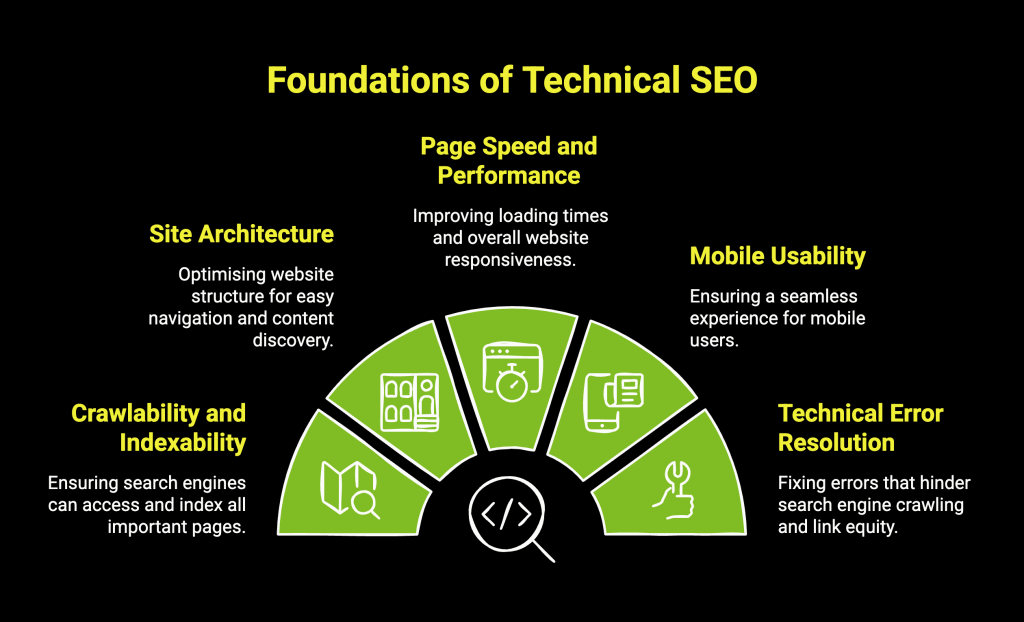
Infographic on foundations of technical SEO
Search engines evaluate more than just content quality. They rely on technical signals to understand how a website is structured, how quickly it loads, and whether pages can be accessed and indexed without friction. When these signals are weak, rankings and visibility suffer, regardless of content strength.
An advanced technical SEO audit helps identify and resolve issues that directly impact search performance, including:
- Search engines struggling to crawl or index important pages
- Inefficient site architecture that buries high-value content
- Slow page speed and performance issues affecting rankings and engagement
- Mobile usability and rendering problems under mobile-first indexing
- Technical errors that dilute link equity and crawl efficiency
By fixing these issues, a technical SEO audit online ensures search engines can process your site accurately while delivering a smoother user experience. This combination improves ranking stability, scalability, and long-term organic growth.
How Is a Technical SEO Audit Different From a General SEO Audit?
A technical SEO audit and a general SEO audit serve different purposes, even though they are often grouped together. One focuses on whether search engines can properly access and process a website, while the other evaluates how well the site is optimised with the use of SEO tools once it is accessible.
The table below clearly outlines how a technical SEO audit differs from a general SEO audit, helping you understand where each fits within a complete SEO strategy.
| Aspect | Technical SEO Audit | General SEO Audit |
| Primary focus | Website infrastructure and system-level SEO | Overall SEO health and optimisation |
| Core objective | Ensure search engines can crawl, index, and render pages | Improve relevance, authority, and visibility |
| Key areas reviewed | Crawlability, indexation, site structure, page speed, mobile usability, security | Content quality, keywords, on-page SEO, backlinks, local SEO |
| Impact on SEO | Removes technical barriers that block rankings | Improves competitiveness once pages are accessible |
| Typical issues found | Crawl errors, slow pages, duplicate URLs, improper redirects | Thin content, poor keyword targeting, weak backlinks |
| When it’s needed | Before major SEO work, migrations, or scaling | Ongoing optimisation and competitive analysis |
What Does a Technical SEO Audit Cover?
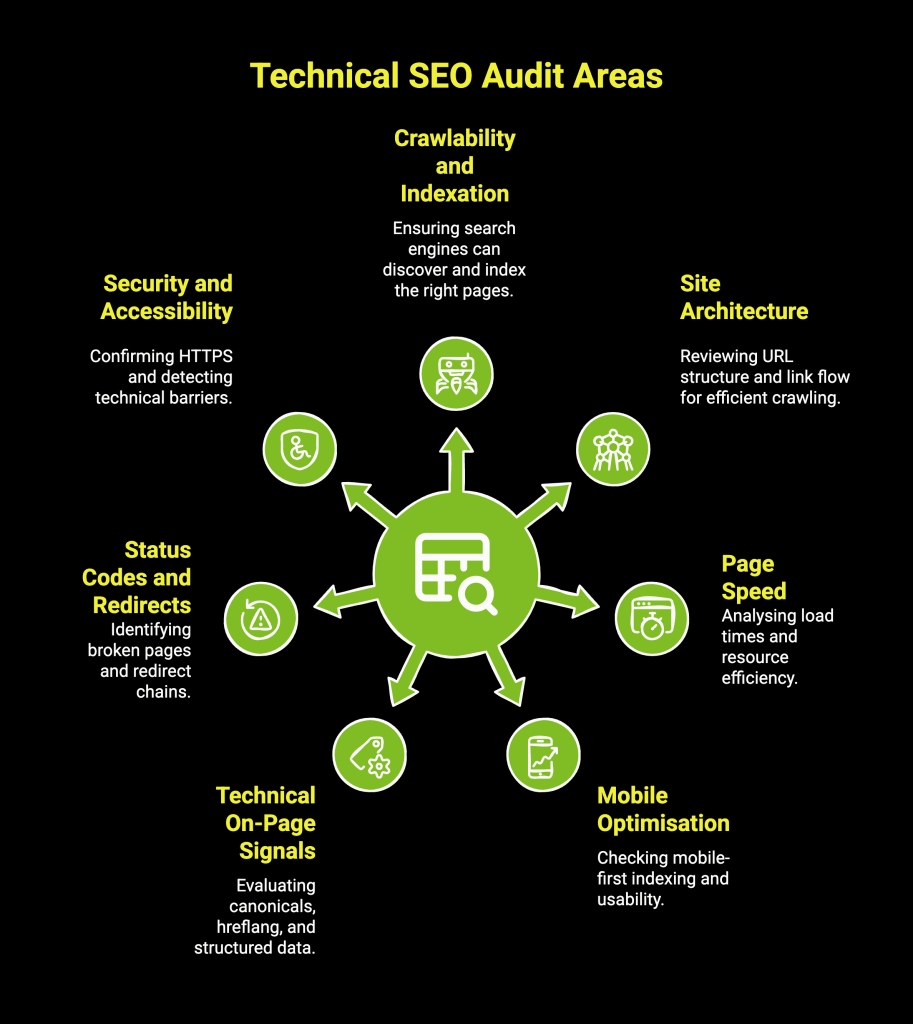
Infographic on technical SEO audit areas
A technical SEO audit evaluates the core systems that determine how search engines access, interpret, and prioritise your website. Instead of surface-level optimisation, it focuses on identifying structural and performance issues that directly affect crawlability, indexation, user experience, and link building.
A comprehensive technical SEO audit typically covers the following areas:
- Crawlability and indexation: Ensuring search engines can discover, crawl, and index the right pages while excluding low-value or duplicate URLs
- Site architecture and internal linking: Reviewing URL structure, page depth, and link flow to support efficient crawling and ranking signals
- Page speed and performance: Analysing load times, Core Web Vitals, and resource efficiency across devices
- Mobile optimisation: Checking mobile-first indexing readiness, responsiveness, and usability errors
- Technical on-page signals: Evaluating canonicals, hreflang, pagination, and structured data setup
- Status codes and redirects: Identifying broken pages, redirect chains, and server errors
- Security and accessibility: Confirming HTTPS implementation and detecting technical barriers that affect trust and access.
Together, these checks form the foundation of a reliable technical website audit, ensuring your site is search-ready and built to scale.
When Should You Run a Technical SEO Audit?
A technical SEO audit is not a one-time task. It should be performed at key moments to prevent hidden issues from limiting visibility, performance, or growth. Running audits proactively helps catch problems early before they affect rankings or user experience.
You should run a technical SEO audit in the following situations:
- Before starting SEO campaigns, ensure technical barriers do not block results
- After a website redesign or migration to detect crawl, indexation, or redirect issues
- When traffic or rankings drop unexpectedly to identify technical causes
- For fast-growing or large websites where crawl efficiency and structure become critical
- For e-commerce sites with frequent product, category, or filter changes
- As part of ongoing SEO maintenance to keep the site healthy as it evolves
Regular technical SEO audits help maintain a stable foundation, allowing content and optimisation efforts to deliver consistent, long-term results.
How to Perform an SEO Audit? A 13-Step SEO Technical Audit Checklist
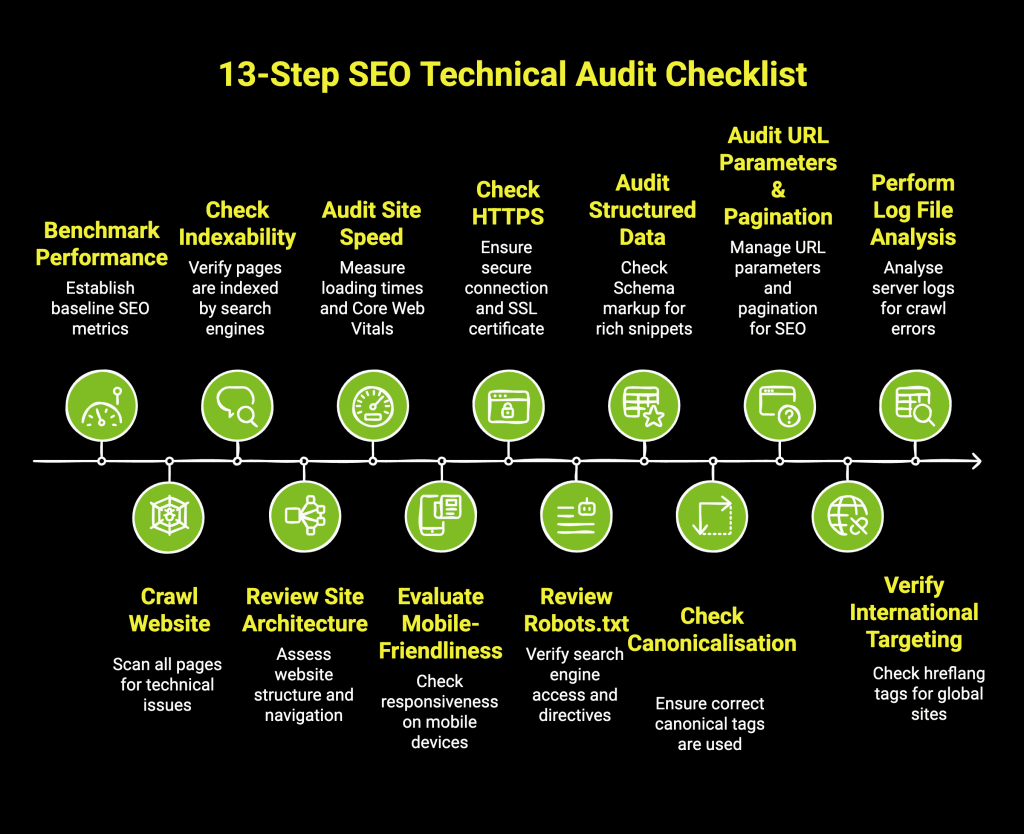
Infographic on 13 step SEO technical audit checklist
Performing a technical SEO audit requires a structured approach to identify issues accurately and prioritise fixes effectively.
Following these clear steps ensures your SEO technical analysis and evaluation lead to actionable improvements rather than a long list of unchecked errors.
Step 01: Benchmark Current Performance
Tool Required: Google Search Console, Google Analytics, Ahrefs, and Semrush
Benchmarking gives you a clear baseline to measure the impact of future SEO improvements. Start your audit by understanding where your site stands:
- Track Organic Traffic & Rankings: Use tools like Ahrefs or Semrush to monitor keyword rankings, traffic volume, and visibility trends across pages to understand current SEO performance.
- Identify Top Pages: Pinpoint which pages generate the most organic traffic and keyword impressions. These are your SEO assets; protect and optimise them for even greater visibility.
- Monitor Index Status: Check Google Search Console to ensure important URLs are indexed correctly and not accidentally excluded due to crawl errors, tags, or sitemap issues.
Once you know what’s working, the next step is to uncover what’s holding your site back behind the scenes.
Step 02: Crawl Your Website
Tools Required: Screaming Frog, Sitebulb, Ahrefs, Semrush
Use a site audit tool to scan your website like a search engine. Focus on these key issues:
- Broken Links (404s): Identify and fix dead internal or external links that lead to error pages, as they disrupt user experience and waste crawl budget.
- Redirect Chains/Loops: Detect and fix redirect chains or loops that confuse search engines, slow down crawling, and weaken link equity passed between pages.
- Crawl Errors: Review crawl reports to ensure crucial pages aren’t blocked, missing, or returning server errors that prevent them from being indexed properly.
- Duplicate/Thin Content: Spot and resolve pages with low-value or duplicate content to prevent keyword cannibalisation and improve the overall content quality of your site.
Export all crawl data (Excel or CSV) to work through the issues systematically. Once your crawl is complete and the data is in place, it’s time to check what’s actually making it into Google’s index and what’s being left out.
Step 03: Check Indexability
Tool Required: Google Search Console – Coverage & URL Inspection
Ensure search engines can properly index your site. Check for:
- Excluded Pages: Identify pages blocked by noindex, canonical, or robots.txt that shouldn’t be.
- Index Bloat: Remove low-value or duplicate pages cluttering the index.
- XML Sitemap Alignment: Make sure your sitemap only includes important pages and matches what’s being indexed.
After ensuring your key pages are properly indexed, the next step is to make sure they’re easily discoverable, for both users and search engines.
Step 04: Review Site Architecture
Tool Required: Screaming Frog, Sitebulb, GlooMaps, or visual crawl maps
Evaluate how your site is structured for users and search engines:
- Flat Architecture: Key pages should be accessible within 3 clicks from the homepage.
- Logical URLs: Use clear, descriptive URLs (e.g. /services/seo-audit ).
- Internal Linking: Link to important pages to pass authority and guide crawlers.
- No Orphan Pages: Ensure every page is linked from somewhere on the site.
With your site structure optimised, it’s time to focus on performance, because speed isn’t just a ranking factor, it’s a user expectation.
Step 05: Audit Site Speed and Core Web Vitals
Tools Required: PageSpeed Insights, Lighthouse, GTmetrix
Optimise for a fast, smooth user experience:
- LCP < 2.5s: Ensure main content loads quickly.
- FID < 100ms: Make site interactive without delay.
- CLS < 0.1: Prevent layout shifts during load.
- Speed: Improve mobile and desktop load times.
- Fixes: Compress images, lazy load media, and reduce render-blocking scripts.
To improve rankings and engagement, speed alone isn’t enough; your website must also deliver a flawless experience on mobile devices.
Step 06: Evaluate Mobile-Friendliness
Tools Required: Google’s Mobile-Friendly Test
Most users now experience your website on mobile first. If your site does not perform well on mobile, it can lose visibility, engagement, and potential customers. Check if your site delivers a seamless experience across all mobile devices:
Readable Text: Ensure fonts are large enough and don’t require zooming.
- Responsive Design: Your layout should adjust smoothly to different screen sizes.
- Clickable Elements: Buttons, links, and forms must be spaced well to avoid accidental taps.
With mobile usability in place, the next critical step is securing your site, because safety isn’t optional for users or search engines.
Step 07: Check HTTPS & Security
Tools Required: SSL Checker, Ahrefs Site Audit, Why No Padlock
Google prefers secure websites, and so do users. If your site isn’t fully on HTTPS, it may trigger browser warnings, lose trust, and impact rankings. Secure your site and build user trust:
- All Pages Use HTTPS: Every URL should load securely with an SSL certificate.
- Redirect HTTP to HTTPS: Set up 301 redirects from HTTP to HTTPS versions.
- No Mixed Content: Ensure HTTPS pages don’t load insecure HTTP scripts, images, or styles.
Now that your website is secured with HTTPS, it’s time to check whether search engines can freely crawl and index your most valuable content.
Step 08: Review Robots.txt File and Meta Robots
Tools Required: Google Search Console, Screaming Frog
Your robots.txt file guides search engine crawlers, but one wrong line can block key pages or resources, harming your SEO. Ensure search engines can access and index the right content:
- No Critical Pages Blocked: Confirm important URLs aren’t disallowed in robots.txt.
- Access to Assets: Make sure Googlebot can crawl key files like CSS and JS.
- Correct Tag Usage: Use noindex, nofollow, and canonical tags wisely to control indexing and avoid duplicate content issues.
Once search engine access is in place, take the next step by improving how your content is interpreted, with structured data that enhances visibility in search.
Step 09: Audit Structured Data (Schema Markup)
Tools Required: Google’s Rich Results Test, Schema Validator
Structured data helps search engines understand your content and can unlock rich snippets in search results. But if implemented incorrectly, it does more harm than good. Enhance visibility with clean, error-free schema:
- Use Key Schema Types: Focus on Product, Article, Breadcrumb, and FAQ schema for rich results.
- Fix Errors/Warnings: Address any validation issues to ensure eligibility for enhanced search features.
- Avoid Duplication: Only one schema set per entity to prevent confusion.
The schema is set, but clarity matters. Next, ensure canonical tags are correctly implemented to consolidate SEO signals and avoid internal competition.
Step 10: Check for Canonicalisation Issues
Tools Required: Screaming Frog, Google Search Console
Proper canonicalisation ensures search engines index the right pages and improves overall site SEO health. Prevent duplicate content and consolidate ranking signals:
- Self-Referencing Canonicals: Every page should point to itself with a canonical tag to confirm its preferred version.
- Avoid Duplicates: Use canonicals to handle similar URLs caused by parameters, tags, or pagination.
With canonicals in place, turn your attention to URL parameters and pagination, often overlooked issues that silently eat into crawl budget and rankings.
Step 11: Audit URL Parameters and Pagination
Tools Required: Google Search Console (Legacy Tools – URL Parameters)
Managing parameters and pagination ensures better crawl control and prevents diluted SEO value across similar URLs. Keep your site clean and crawl-efficient:
- Avoid Duplicate Indexing: Make sure URL parameters (like filters or sorting) don’t generate indexable duplicates.
- Handle Pagination Correctly: Use proper pagination signals, like rel=”next” and rel= ” prev” (or structured data alternatives if deprecated).
If your site serves users across languages or regions, the next step is crucial: verifying international targeting to avoid cross-market SEO conflicts.
Step 12: Verify International Targeting (If Applicable)
Tool Required: GSC (International Targeting Report)
Proper international targeting improves user experience and rankings in different countries or language-specific searches. Optimise for global audiences without confusing search engines:
- Use hreflang Correctly: Implement hreflang tags to show the right language/region version to users.
- Avoid Conflicts: Ensure there are no mismatched or duplicate hreflang entries that confuse search engines.
You’ve optimised what search engines should see, now it’s time to analyse what they actually crawl with a deeper dive into log file data.
Step 13: Log File Analysis
Tool Required: Screaming Frog (Log File Analyser)
Log file analysis helps refine your technical SEO strategy and ensures Google focuses on your most important pages. Gain deep insights into how search engines crawl your site:
- Track Crawled Pages: See which URLs Googlebot is actually visiting to identify crawl gaps.
- Fix Crawl Budget Waste: Detect if low-priority or duplicate pages are consuming crawl resources.
Why Work With Wild Creek Web Studio for Your Technical SEO Audit?
Wild Creek Web Studio specialises in uncovering and fixing the technical issues that quietly limit search visibility. Instead of generic audit reports, their approach focuses on identifying structural gaps, prioritising fixes, and aligning technical SEO improvements with real business goals.
With deep expertise in technical SEO, site architecture, and performance optimisation, Wild Creek Web Studio helps brands build search-ready websites that scale. From crawlability and indexation to Core Web Vitals and complex site structures, their audits are designed to turn insights into measurable growth.
If you’re looking for a technical SEO partner that values clarity, precision, and long-term results, Wild Creek Web Studio helps you move from diagnosis to execution with confidence.
Final Words
A technical SEO audit is not about ticking boxes or fixing random warnings. It is about clearing the obstacles that stop search engines from seeing your website the way you intend. When those obstacles are removed, your content, links, and SEO efforts finally get the chance to perform.
Think of it as resetting the foundation. Once the technical gaps are addressed, growth becomes easier, rankings become more stable, and future optimisation delivers stronger results. A well-audited site is not just optimised for today, but built to scale with search tomorrow.
Frequently Asked Questions
What are the key steps to a quick technical SEO audit?
To conduct a quick technical SEO audit, begin by analysing site performance, checking for crawl errors, and reviewing metadata. Next, assess mobile-friendliness and evaluate page speed. Finally, identify issues like broken links or duplicate content to prioritise for resolution.
Which tools should I use for my technical website audit?
For an effective technical website audit, consider using tools like Screaming Frog for crawling and analysing your site, Google Search Console for performance insights, and PageSpeed Insights for speed evaluations. Each offers unique features that can enhance your audit process.
What makes an effective SEO audit checklist for U.S. websites?
An effective SEO audit checklist for U.S. websites includes comprehensive keyword analysis, on-page optimisation checks, mobile usability, site speed assessments, structured data implementation, and thorough backlink evaluations to ensure both technical compliance and user experience alignment.
How to conduct a technical seo site audit?
Conduct a technical SEO site audit by benchmarking performance, crawling the website for errors, checking indexability, site structure, speed, mobile usability, and crawl controls. Analyse structured data, canonicals, and logs to identify and prioritise fixes that improve crawlability and visibility.
Can beginners use free technical SEO audit tools effectively?
Yes. Beginners can effectively use free tools like Google Search Console, PageSpeed Insights, and Screaming Frog (free version) to identify crawl issues, indexing problems, speed gaps, and mobile usability errors, as long as they follow a structured audit checklist.
What tools do you use for technical SEO audits?
Commonly used tools include Google Search Console, Google Analytics, Screaming Frog, Sitebulb, Ahrefs, Semrush, PageSpeed Insights, Lighthouse, and GTmetrix for crawling, performance, indexing, and technical diagnostics.
What is the best tool for a technical SEO Audit Report?
There is no single best tool. Screaming Frog and Sitebulb are ideal for detailed technical audits, while Semrush and Ahrefs work well for combined technical, keyword, and reporting insights. Google Search Console is essential for validation.
Can ChatGPT do an SEO audit?
ChatGPT can assist with SEO analysis by reviewing page content, meta tags, and internal links, flagging technical seo issues conceptually. However, it cannot measure load speed or data, so seo professionals should combine it with tools for search engine rankings.
What is an e-commerce site SEO technical audit?
An e-commerce site SEO technical audit reviews how well search engines crawl, index, and rank an online store. It focuses on site structure, indexation, page speed, mobile usability, duplicate URLs, faceted navigation, and technical errors that affect product visibility.